

10 Steps to Find Real Online Sales Jobs on Indeed in 2026
Overview
Introduction: Why Indeed Still Matters for Online Sales Jobs in 2026
You type "sales jobs" into Indeed. Thousands of results appear. But something feels off.
Some postings look too good to be true. Others ask for money upfront. And a few might be scams disguised as dream opportunities.
Sound familiar?
Here is the reality. Indeed remains the largest job aggregator in the world with millions of active listings. According to Indeed’s 2026 US Jobs & Hiring Trends Report, the platform processed millions of real-time job postings to understand where the market is heading. Yet finding legitimate online sales roles among all that noise feels like finding a needle in a haystack.
The problem gets worse when you search for jobs hiring near me indeed. You want something local, remote, or both. But separating real commission-based roles from shady offers takes serious skill.
We get it. That is why we wrote this guide.
This article walks you through 10 actionable steps to turn your job search like indeed into a targeted pipeline that actually delivers. No fluff. No guesses. Just practical strategies that work in 2026.
Think of this as your roadmap. You will learn how to spot red flags, filter better, and focus only on opportunities worth your time.
If you want a deeper look at how Indeed compares to other platforms, check out our guide on which online sales job board is best Indeed ZipRecruiter or CareerBuilder.

It helps you decide where to focus your energy.
Let us start fixing your search today. You deserve a real sales job, not another wasted application.
View Resources for guides and articles that help you land legitimate remote sales jobs.
1. Master Boolean Search Strings to Find Hidden Sales Jobs
You know the feeling. You type "sales jobs" into Indeed, and the results come back with hundreds of listings. Most of them are not what you want. Some are entry-level roles you already outgrew. Others are from third-party recruiters who do not even name the company. It gets frustrating fast.
Here is the fix. Boolean search strings let you tell Indeed exactly what to show and what to hide. Think of them as cheat codes for your job search like indeed.
The basic operators are simple. Use AND to combine terms, OR to show either term, and NOT (written as a minus sign) to exclude words. For online sales, a strong search might look like this:
remote sales AND commission -recruiter -entry

That tells Indeed to show only remote sales jobs with commission that avoid recruiter postings and entry-level noise. You can go further by adding specific skills or industries. Try something like:
SaaS OR B2B AND closing -intern -trainee
Add a location modifier to find hybrid or local remote roles, like "indeed jobs san antonio" plus your Boolean terms.
This works because Indeed processes millions of real-time job postings, as shown in their 2026 U.S. Jobs & Hiring Trends Report. Without filters, you drown in noise. With them, you find the hidden gems.
For a deeper dive into custom search tricks, check out our guide on mastering advanced search tactics for remote sales jobs on Indeed. It covers more operators and saved alerts.
Ready to put this into action? View Resources for more strategies to land legitimate remote sales roles.
2. Set Up Precision Job Alerts That Deliver Daily
Manually searching for jobs works great for a deep dive. But you cannot sit on Indeed all day waiting for fresh postings.

The best opportunities get filled fast. That is why precision job alerts are so helpful. They bring the right roles to you without the daily grind.
Here is the key. Do not create just one broad alert. Make multiple alerts for specific job types. Set one for "remote inside sales" and another for "high commission closing". Narrow alerts cut through the noise. There are currently over 187,000 commission-based remote sales jobs listed on Indeed. A broad alert pulls everything. A precision alert pulls only the roles you actually want.
Set your alert frequency to "Daily". This keeps your inbox clean. If you want a real edge, turn on immediate email notifications. Being the first to apply gives you a serious head start.
A common frustration people have is feeling like indeed for employers not working well for their specific goals. The problem is usually not the platform itself. It is the alert setup. When you do a standard job search like indeed, the default filters are usually too wide. Most job search websites like indeed let you save searches, but few people customize them enough. If you are hunting for jobs hiring near me indeed, just add your city or zip code right into the alert settings. The same logic applies for indeed jobs san antonio or any location.
Here is the trick most people skip. Refresh your alerts every two weeks. The market shifts. You might have learned a new skill or decided to target a different industry. Update the keywords. This keeps your search sharp and removes stale listings.
For a complete walkthrough on filters and saved searches, check out our guide on mastering advanced search tactics for remote sales jobs on Indeed.
Ready to build your own system? View Resources for more strategies to land legitimate remote sales roles.
3. Filter by Remote, Commission-Based, and Online-Only Roles
You found a promising job listing. It says "remote." But after you apply, the recruiter says you need to come into the office twice a week. Annoying, right? That is why filtering matters more than you think.
On job search websites like Indeed, the default results are messy. You need to be specific.
Start by clicking the "Remote" filter. Then look for the salary filter and choose "Commission" or "Commission Only". This cuts through the noise. Right now, there are over 187,000 commission based remote sales jobs listed on Indeed. That is a huge pool, but only if you filter correctly.
Next, pay attention to the job title. Look for words like "work from home", "virtual", or "100% remote". Many companies use these terms in the title. You can find thousands of virtual commission sales jobs on Indeed that are truly online only.
But be careful. Some listings say "remote" but are actually hybrid. The recruiter expects you to come in sometimes. How do you avoid these? Use the "exact location" search. For example, if you search for indeed jobs san antonio, make sure you set the location to "Remote" or "San Antonio, TX" with the remote filter on. You can also add a keyword like "fully remote" to exclude hybrid roles.
For deeper tips on refining your search, check out our guide on mastering advanced search tactics for remote sales jobs on Indeed.
If you are ready to build a solid list of legitimate roles, explore our resources for landing remote sales jobs. View Resources
4. Optimize Your Indeed Profile to Attract Sales Recruiters
You have a 50% incomplete Indeed profile. A recruiter sees it. They move on. That is the reality in 2026. A complete profile is your best tool to stand out.
According to Indeed’s own advice, keeping your profile complete and up to date helps employers evaluate your qualifications quickly. Here is exactly how to set yours up to attract the right recruiters.
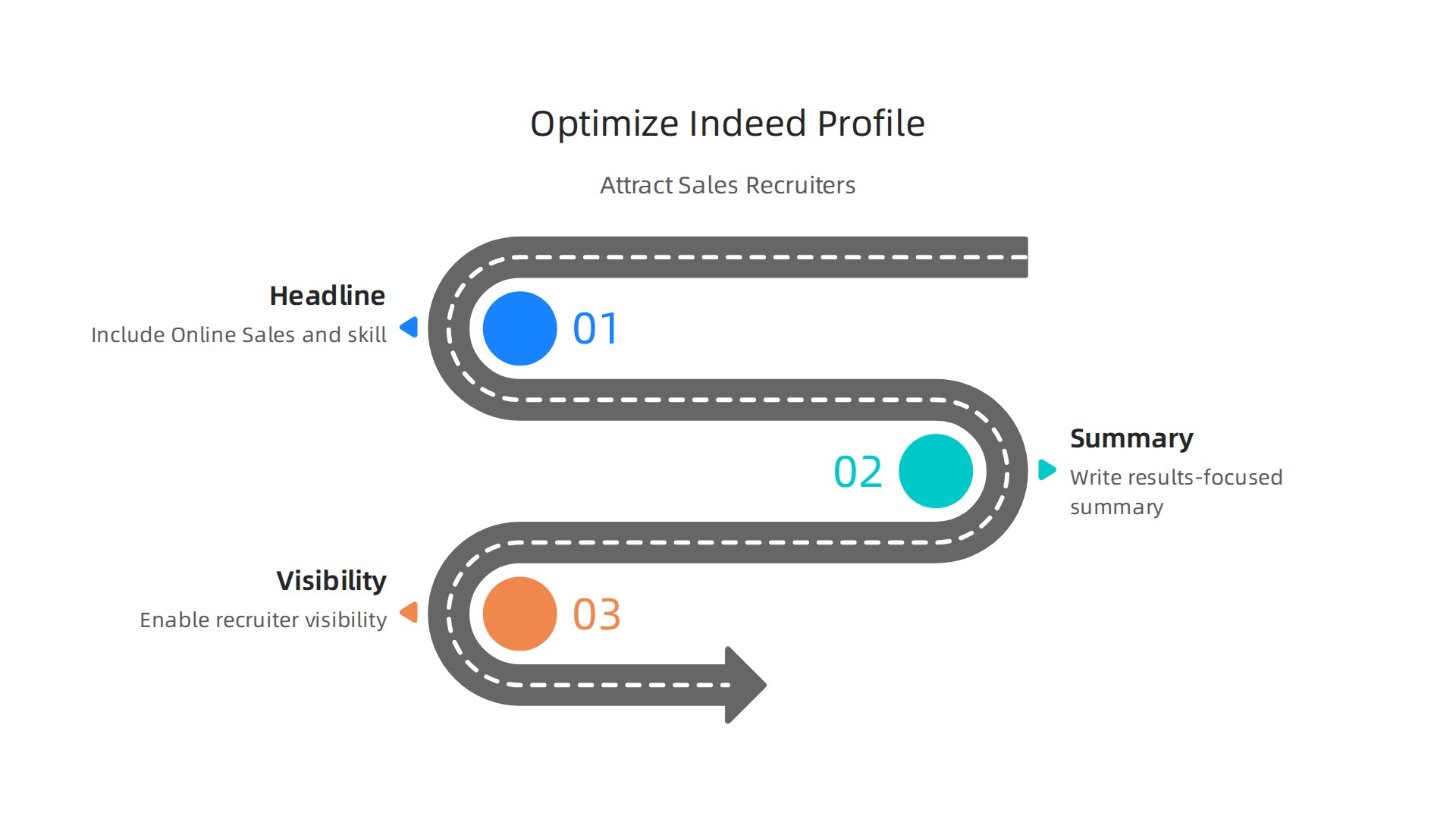
Start with your professional headline. Do not just write "Sales Representative." Be specific. Include the words "Online Sales" and your top skill. For example, "Online Sales Specialist | CRM Expert | Quota Achiever."
This makes you searchable for the job search like indeed recruiters run every day.
Next, write a short summary. Focus on results. Mention numbers that prove you can sell remotely. Something like, "Exceeded quota by 30% working 100% remote." Recruiters scan for metrics. Give them the good stuff fast.
Finally, turn on the setting that says "Let recruiters know you’re open to work." Set its visibility to "visible to all employers." This is a simple switch that puts you in front of more hiring managers. Many job search websites like indeed make this option easy to find in your profile settings.
If you use these three steps, your profile will get noticed more often. To get even more help choosing which platforms are best for remote sales, read our guide on best job search engine sites for remote sales jobs.
Ready to put this into action? Start building your profile now. Then explore our complete collection of guides and tips for landing top remote sales roles.
5. Leverage Company Pages and Employee Reviews
Your profile is polished. You are ready to apply. But wait. Where should you actually send your application? Not all sales jobs are equal. Some companies have great remote cultures. Others just say they do. You need to find the real story.
Start with Indeed Company Pages. Read employee reviews. Look for patterns about pay transparency and remote culture.

Do sales reps hit their quotas? Is the training helpful? Reviews tell you the truth quickly. Using job search websites like indeed this way helps you avoid wasting time on bad fits. Indeed itself offers tips on how to get better search results on Indeed by using all the tools available. Reviews are one of the most powerful tools you have.
Next, check the Q&A section. This is a hidden gem. You can ask current or past employees direct questions. Ask about commission structure. Ask about onboarding for new remote reps. Real people give real answers. This helps you decide if the role fits your goals.
Another smart move is to follow companies that post sales jobs you like. When you follow them, you see new listings first. You get early access to openings. For top remote sales jobs, this early look can make all the difference.
Mastering your job search like indeed power users do means using every feature. To compare Indeed with other platforms, read our guide on best job search engine sites for remote sales jobs.
Ready to find a company that truly supports its sales team? Explore our complete collection of guides to help you land the right role. View Resources
6. Use Indeed’s Salary Tools to Estimate True Earning Potential
You found a company with great reviews. Now comes the big question. How much will you actually earn? Some sales jobs look amazing on paper but hide the real numbers. Indeed gives you smart ways to find the truth.
First, open the job posting and click the "Salary" tab. Indeed shows average pay ranges for that role based on real data. For example, a remote sales job might list an OTE (On-Target Earnings) of [$160,000 to $180,000](https://www.indeed.com/q-ote-salary-l-remote-jobs.html). That number includes base pay plus commission. The tab helps you see if that range matches what other companies offer.
Next, scan the job description for the word "Commission." If the pay section shows "Commission" instead of a fixed salary, the role is mostly commission-based. This is common for many remote sales roles. When you search for jobs like indeed jobs san antonio or jobs hiring near me indeed, watch for this detail. It tells you how much risk is involved.
Finally, use the Indeed Salary Calculator. When a listing gives a base salary plus commission, the calculator estimates total compensation. For example, a job with a $45,000 base plus uncapped commission can mean much higher earnings if you perform well. This tool makes comparing offers easier.
Part of a smart job search like indeed power users means never guessing about pay. You have the data. Use it to pick roles that match your income goals.
Want more tips on reading salary details? Check out our guide to mastering advanced search tactics for remote sales jobs on Indeed.
Ready to find a sales job where the pay is real? View Resources for more guides and tools.
7. Tailor Your Resume for Online Sales Keywords
You checked the pay. Now it is time to make your resume stand out. A powerful job search like indeed uses keywords that match what employers want.

Start by scanning Indeed for common keywords. Terms like "CRM," "cold outreach," and "virtual demos" appear in many remote sales jobs. For instance, when you look at roles offering OTE ranges of $160,000 to $180,000, those same job descriptions often list specific software and methods. Use these words on your resume. This helps you pass ATS scanners.
ATS stands for Applicant Tracking System. Many job search websites like indeed use automated systems to screen resumes first. Fancy designs and graphics can confuse these systems. So use a simple, plain text resume. Keep your file clean and easy to read. This ensures your keywords actually get noticed.
Finally, include a link to your LinkedIn profile. Make sure your profile has endorsements for remote sales skills. This adds proof to what your resume says and shows hiring managers you are credible.
If you want to avoid scams while applying for jobs, read our guide on landing real remote sales jobs in 2026 for extra safety tips.
Ready to improve your resume and land more interviews? View Resources for more job hunting guides.
8. Apply Directly Through Company Sites to Beat Competition
Your resume is ready. You found roles with the right pay. Now here is a move most job search like indeed users miss.
Clicking "Easy Apply" feels fast. But that speed has a cost. When you use that button, your application goes into a huge pile with hundreds of others. The company might not even see it for weeks.
Here is the better way. Use job search websites like indeed as a discovery tool. Find the job there. Then click "Apply on company site" instead.

A study by ResumeWorded confirms that applying directly on a company’s website is better than using any second-hand platform, including Indeed, LinkedIn, or Monster source: resumeworded.com.
Why does this work?
Companies see direct applications faster. Plus, you skip some of the automated clutter. There is a catch though. Many company sites have long application forms. Actually, 92% of candidates give up when the process is too complex source: tryhellohire.com. So save your resume in a plain text version. Copy and paste your details fast. Stick with it because the payoff is real.
Set up a separate email folder just for these direct applications. Track which ones you sent and when to follow up.
Using Indeed this way helps you find jobs hiring near me indeed listings and roles like indeed jobs san antonio. But you apply on the company’s turf.
For more ways to spot legitimate roles and avoid fake listings, read our guide on landing real remote sales jobs in 2026.
Ready to put this strategy into action? View Resources for more job hunting guides.
9. Upskill with Free Sales Certifications Listed on Indeed
You already know that a strong resume helps you stand out. But here is something most job seekers miss. You can boost your profile without spending a dime.
Indeed has a hidden gem. It is the Skills section. Many job listings link directly to free training courses right there.

You can find certifications for tools like Salesforce Admin or HubSpot Sales without leaving the site.
Here is why this matters for your job search like indeed strategy. When recruiters search for candidates, they filter by specific skills. If you have a certification that matches one of those filters, your profile moves to the top of the list.
So how do you find the right skills to learn?
Look at the Most Requested filter on sales role listings. See which keywords appear again and again. Common ones include CRM software, cold calling, and lead generation. Focus your learning there.
Once you finish a course, add it to your Indeed profile right away. This tells the platform you are an active learner. It also helps you rank higher when recruiters run searches for job search websites like indeed listings.
Think about it this way. Every certification you earn is proof you can do the work. It is not just a piece of paper. It shows you took the time to learn something valuable. That kind of effort stands out when you are competing against people who only clicked Easy Apply.
For a deeper look at which training programs actually lead to real jobs in 2026, check out our guide on choosing the right medical sales training program.
View Resources for more free learning recommendations.
10. Spot and Avoid Online Sales Job Scams Using Indeed Signals
You have built your skills and found great listings. Now here is the hard truth. Scammers know you are looking. In 2026, remote job scam losses hit $521 million, according to the Federal Trade Commission. That is a lot of people who trusted the wrong listing.
So how do you tell the real from the fake when doing your job search like indeed? Look for these warning signs first.
Red flags you should never ignore
Some listings look too good to be true. That is because they are. Watch out for these common tricks:
- Guarantees of huge earnings with no experience needed
- Poor spelling or grammar in the job description
- Requests for upfront payment for training or equipment
- Vague job duties that sound more like a sales pitch than a real role
If you see these signs, do not apply. Check the company name against the FTC advice on job scams for extra safety.

Use Indeed’s own tools to protect yourself
Here is the good news. Indeed gives you ways to fight back. Use the Report job button when something feels off. That helps other job seekers too.
You should also read company reviews on the platform. If multiple people mention unpaid work or strange demands, trust that pattern. Indeed publishes guidance on spotting scams, and following those signals keeps you safe.
Verify the employer before you engage
Take one extra step. Look up the company domain and see if it matches the listing. A real employer has a working website with a physical address. Cross-reference that address with the Better Business Bureau.
And here is a simple truth. If a job asks for your bank details or a payment before you start, walk away. No real sales role works that way.
What to do if you spot a scam
Report it to the FTC right away. You can also flag it on Indeed so the listing gets removed. Every report helps protect the next person searching for jobs.
If you want to learn more about finding safe opportunities, check out our guide on how to land real remote sales jobs in 2026 without getting scammed. It covers more signals to watch for and steps to verify any employer.
Staying safe means you can focus on what matters. Finding a real job that actually leads somewhere.
Get Started with guides and resources designed for remote sales success.
Summary
This guide shows how to turn Indeed from a noisy listings feed into a focused pipeline for legitimate online sales jobs in 2026. It covers practical tactics — from building advanced Boolean searches and setting precision alerts, to filtering for truly remote or commission-based roles and optimizing your Indeed profile to attract recruiters. You’ll learn how to use company pages and salary tools to verify employers and estimate real earnings, how to tailor resumes for ATS and sales keywords, and why applying on company sites often improves your chances. The article also explains free certification options to boost visibility and gives clear signals to spot and report scams. Read it and you’ll be able to find higher-quality listings faster, apply more effectively, and avoid common frauds so your job search actually leads to real offers.