

Master Advanced Search Tactics for Remote Sales Jobs on Indeed
Overview
Stop Wasting Time on Indeed – Master These Advanced Search Tactics
You already know Indeed is the biggest job board around. But here is the honest truth that most remote sales seekers ignore.
When you run a basic Indeed search job for "sales," you get thousands of results. Most of them are useless. Some are not remote. Some are commission-only scams. Many are jobs posted months ago that were never filled.
The problem is simple. A generic search buries the good opportunities under a pile of noise. According to Indeed’s own guide to getting better search results, using filters like remote work options, salary ranges, and date posted can dramatically narrow your results. Most people never touch these settings.
That is why top remote sales professionals use advanced tactics instead. They rely on Boolean search strings, targeted keyword combos, and smart filters to find real commission-based roles. They skip the scams. They save hours of scrolling.
This guide covers 10 proven methods you can use today to transform your job search on Indeed.

You will learn how to spot legitimate opportunities, filter out low-quality listings, and finally land interviews faster.
If you want to compare how Indeed stacks up against other platforms, check out our breakdown of the best job search engine sites for remote sales jobs to build a complete strategy.
View Resources for more guides and expert tips to help you land the right remote sales role.
1. Master Boolean Search Operators for Remote Sales Jobs
Typing "remote sales job" into the search bar is a good start. But it does not cut through the noise. The real trick to a successful job search on Indeed is using Boolean search operators.
Boolean sounds technical. But it is just a way to tell Indeed exactly what you want using simple words like AND, OR, and NOT. As Indeed’s guide on Boolean search strings explains, these operators help you narrow or widen your results with precision.
Think of it as giving the search engine clear instructions.
Instead of just searching "sales," try this: remote AND commission AND SaaS. This finds jobs that mention all three terms. It naturally filters out non-remote roles and non-commission jobs. Use OR when you want synonyms like 'sales development' OR SDR. And use NOT (or a minus sign) to block words you do not want.
Here is a powerful string for your Indeed search job:
remote AND ('sales development' OR SDR) AND commission -manager

This single line does the heavy lifting. It finds remote sales roles that pay commission and removes results with "manager" in the title. It is a simple way to improve your job search on Indeed while skipping the spam.
Most people skip this step. That is why they see hundreds of irrelevant listings. You can be smarter about it. For more ways to filter out low-quality opportunities, read our guide on how to land real remote sales jobs in 2026 without getting scammed.
Start using Boolean strings today and watch your results change. Contact Us to talk about your sales career goals and get personalized guidance.
2. Use Indeed’s Advanced Filters to Target Commission-Based Roles
You have your Boolean string ready. But you still might see results that don’t quite fit. That is where Indeed’s built-in filters come in. They help you slice through the noise even further.
After you run your search, look on the left side of the page. You will see filter options like Job Type, Salary, and Remote.

According to Indeed’s own tips on getting better search results, applying these filters is one of the fastest ways to narrow your results to only the roles that matter.
Here is what you need to focus on for commission-based remote sales jobs:
- Job Type: Select "Contract" or "Commission" if you see those options. Many sales roles are structured this way.
- Remote: Choose "Remote" or "Work from Home." But here is the catch: not every employer tags their postings correctly. So also search without this filter and scan job descriptions for the word "remote."
- Salary: Enter a minimum salary that makes sense for you. This filters out roles that pay too little.
Try stacking these filters together. For example, set Job Type to "Commission" and Location to "Remote." This combination works great for your job search on Indeed when you want high-earning potential.
You can also use the Company filter. Type in names of known remote-first sales employers. Companies like Salesforce, HubSpot, or Zoom often hire remote sales reps. This helps you focus on trusted brands and avoid scams.
Your indeed search job does not have to be frustrating. A few clicks with these filters can save hours of scrolling. For more ways to pick the right platform, read our comparison of Indeed vs ZipRecruiter vs CareerBuilder.
Start using these filters today and only see the jobs worth your time.
Contact Us to get personalized help finding commission-based remote sales roles.
3. Automate Your Search with Smart Job Alerts
You have your filters set up. You have your Boolean string ready. But new jobs get posted every hour. Do you really want to keep refreshing the page all day? That is where job alerts save the day.
Setting up alerts on Indeed is simple. According to Indeed’s own tips on getting better search results, job alerts are a convenient way to stay aware of new opportunities. You get an email with a list of jobs that match your criteria. No manual checking needed.
Here is the smart way to do it. Do not create just one alert. Create multiple alerts with different keyword combinations. For example:
- One alert for "remote sales commission"
- Another for "work from home sales"
- A third for "100% commission remote"
This way you catch every relevant posting. The Indeed Support guide on managing alerts shows you how to fine-tune your settings.
Now choose your frequency. For competitive commission-based roles, set it to "as they post" or "daily." Getting the email right when a job goes live can make the difference between being the first applicant or the hundredth.
One more tip: keep notes on which alert feeds send you the best leads. Over time, you will see which keyword combos produce the most relevant results. This helps you refine your approach and save even more time.
For more ideas on choosing the right platform, check out our guide on the best job search engine sites for remote sales jobs.
Set up your alerts today and let Indeed bring the jobs to you.
View Resources for more tips on landing remote sales roles.
4. Spotting Legitimate Remote Sales Jobs vs. Scams on Indeed
You have your alerts set up and jobs are rolling in. But here is the truth. Not every posting is real. Scammers know that remote sales jobs are in high demand, and they use that to trick people. The good news? You can learn to spot fake listings fast.

Red flags to watch for
Some job ads look too good to be true. That is often a sign. Watch out for these warning signs:
- No company website or a generic one
- Vague job description that does not say what you will actually sell
- Requests for upfront payment for training or equipment
- Unrealistic income promises like "earn $10,000 your first week"
Indeed has a helpful guide on how to know if a job is a scam. It lists common tricks and what to do. Also check out their article on 5 common work from home scams. It covers the exact tactics scammers use.
How to verify a job listing
Do not stop at the job ad. Take a few minutes to dig deeper.
First, use Indeed’s own Company Reviews section. Read what current and past employees say. If the company has no reviews and no real online presence, that is a red flag.
Second, head to Google and LinkedIn. Search for the company name plus "scam" or "complaint." Look for a real website with contact info and a team page. Legitimate remote sales companies like Salesforce or ZoomInfo have clear online footprints.
For a deeper dive on staying safe, check out our guide on how to land real remote sales jobs in 2026 without getting scammed. It goes through more warning signs and steps to protect yourself.
Trust your gut
If something feels off, it probably is. A legitimate employer will never ask you for money to start working. They will be happy to share details about the role and the company. Take your time. A real opportunity will still be there tomorrow.
View Resources for more tips on staying safe during your job search.
5. Compare Indeed with LinkedIn, Glassdoor, and Niche Sales Boards
You now know how to spot scams on Indeed. That is a big win. But using only one site can hold you back. The best remote sales job seekers in 2026 use a mix of tools. Let us look at how Indeed compares to LinkedIn, Glassdoor, and specialized sales boards.
Indeed vs. LinkedIn
Indeed has the most job listings. It is the place to go for volume. But for sales roles, LinkedIn gives you something extra. It helps you connect with people. You can see your network, research hiring managers, and find referrals before you ever apply. This can lead to more interviews. One LinkedIn vs Indeed comparison for 2026 shows the power of networking. Use Indeed for your main job search on indeed. Use LinkedIn to build connections and get a foot in the door.
Glassdoor for Company Research
Glassdoor is a different kind of tool. It is perfect for checking if a company is a good fit. You can see real salary reports and employee reviews. Did a remote sales job catch your eye on Indeed? Look it up on Glassdoor first. Do employees actually earn the commissions promised? What is the culture really like? This extra step helps you avoid wasting time on bad opportunities. According to expert reviews of best job search sites for 2026, Glassdoor is essential for this kind of research.
Niche Sales Boards for Quality
Specialized job boards are your secret weapon. Sites like Remote.co or SalesJobs.com focus only on the types of roles you want. They have fewer listings than Indeed. But the listings they have are often much higher quality. You also face less competition. Not as many people know to look there. The best Indeed alternatives for recruiters and job seekers in 2026 highlight how niche sites can help you find smarter opportunities. For a focused search, these job search sites like Indeed can be goldmines.
Putting It All Together
So which platform is best for you? The smartest strategy is to use them together. Start with an indeed search job to see what is out there. Use LinkedIn to network. Check Glassdoor to verify companies. And browse niche boards for hidden gems.
For a deeper breakdown of the top platforms, check out our guide on which online sales job board is best. It compares Indeed, ZipRecruiter, CareerBuilder, and more for remote sales.
Ready to start a multi platform search? View Resources for guides and tips to land the perfect remote sales job in 2026.
6. Optimize Your Indeed Profile and Resume for Remote Sales
You have your search strategy set. Now let us make sure your profile actually gets seen. Many job seekers on Indeed skip this step. That is a mistake. A well optimized profile can be the difference between a hiring manager calling you back or scrolling right past you.
The key is to speak the language of the platform. Indeed uses an algorithm to rank resumes for each indeed search job. If your resume does not have the right words, it might not even show up in results. So you need to be smart about this.
Use the Right Keywords
Think about what a hiring manager is looking for. They want someone who understands remote sales. So your resume needs to include important terms like "remote," "CRM," "cold calling," and "commission." According to expert advice on optimizing your resume for Indeed in 2026, using relevant keywords is one of the most effective strategies to get past the algorithm and land more interviews. You want to weave these naturally into your work history and skills section. If you are looking for a more complete list of strong terms, check out this guide on great sales resume skills.
Upload a PDF and Use Indeed’s Editor
A big tip: do not just upload one file. Upload a polished PDF resume for recruiters to download. Then also fill out Indeed’s built-in profile editor fully. The platform can read and scan this data much better, which helps your profile show up in more searches. Following the best practices for a work from home resume will set you apart from the crowd.
Add a Professional Headshot and Summary
You also need a photo and a strong summary at the top. The photo should be professional but approachable. Nothing too casual. Your summary should be a short paragraph that highlights your remote sales experience. Mention your track record with hitting targets or managing client relationships. This is your first impression. Make it count. For solid examples, look at some best sales resume examples to see how to write this well.
When you optimize your profile this way, your indeed search job results will start working much better for you. You will get noticed by the right people.
Ready to build a profile that actually works? View Resources for more guides on landing legitimate remote sales jobs.
7. Use Indeed’s Salary and Company Data to Vet Employers
You have your profile ready and your search set. Now comes a step many people skip: checking if a job is actually worth your time. Not every indeed search job listing is a good opportunity. Some are scams. Others just pay badly. Indeed gives you tools to find out before you apply.
Check the Salary Estimator
Sales roles often use commission. So pay can be all over the place. Indeed has a salary estimator that shows what similar jobs pay. Use it to see if the numbers make sense. If a job promises thousands per week with no experience, that is a red flag. The guide on how to know if a job is a scam points out that offers that sound too good usually are.
Read Company Reviews
Company reviews on Indeed tell you a lot. Look for patterns. Do many people complain about unrealistic quotas? Is there high turnover? If you see the same warning signs again and again, trust them. This is one of the best ways to spot dangerous workplaces. For more details, check out the common work from home scams article to stay safe.
Compare Salary Data Across Similar Roles
Do not jump at the first listing you see. Look at several similar positions. Compare the salary ranges. If one job pays way more than all the others, something might be off. If it pays way less, you are being undervalued. Finding a legitimate remote sales job takes a little digging. Read this guide on how to find and land real remote sales jobs in 2026 without getting scammed for more tips.
By using Indeed’s data this way, your job search on Indeed becomes safer and smarter. You save time and avoid bad fits.
Ready to put this into practice? View Resources for more guides and tools to land a great remote sales role.
8. Easy Apply vs. Direct Company Application: Which Works Better?
So you just did an indeed search job and found a remote sales role that looks perfect. Now comes a big question: Do you hit the Easy Apply button or go to the company’s website and apply there?
Easy Apply is fast. You can send your resume in seconds. But here is the catch. For competitive sales jobs, that speed often hurts you. Many recruiters see a flood of Easy Apply submissions and skim right past them. Your application gets lost in the pile.
Direct applications take more time. But they let you stand out. You can write a tailored cover letter. You can attach a portfolio or a sales pitch. That extra effort shows you really want the role. It also helps you dodge situations where companies use Indeed just to collect candidates. Some employers list on Indeed but make you apply on their own system. That is a sign they want serious applicants. For more tips on using Indeed effectively, check out the official guide on getting better search results.
Here is a quick rule of thumb. Use Easy Apply for roles where you just want a quick shot. Use direct applications for the jobs you truly want. For sales roles, direct applications almost always win. To see how Indeed compares with other platforms for your job search on indeed, read our comparison of Indeed, ZipRecruiter, and CareerBuilder for remote sales.
Bottom line: Quality beats speed every time. Take the extra 10 minutes to apply directly. It could be the difference between a callback and a dead end.
Ready to learn more application strategies? View Resources for guides on crafting better applications and landing remote sales jobs.
9. Track Your Applications with Indeed’s Dashboard and Third-Party Tools
You sent out ten applications using your indeed search job results. Now what? If you are like most people, you wait and hope. But hope is not a strategy. You need a system to track every application you send.
Indeed does give you a dashboard called "My Jobs." It shows basic status updates like "Applied" or "Viewed by employer." That is helpful, but it is limited. It does not let you add notes about the company. It does not remind you to follow up after five days. And for a job search on indeed, that is a big gap.
A study tracked 500 applications across platforms in 2026. The results showed that response rates vary a lot depending on where and how you apply. Having a tracking system helps you see what works.
Here is what successful remote sales job seekers do instead:
- Use a simple spreadsheet to log each application with columns for company name, role, date applied, follow-up date, and notes.
- Or use a dedicated tool like Huntr or Jobscan to organize everything in one place.
- Track response times. Most remote sales employers respond within 1 to 2 weeks. If you hear nothing after two weeks, send a polite follow-up email.
This approach also helps you spot patterns. Maybe you get faster responses from direct applications than from Easy Apply. Maybe certain job search sites like indeed give you higher callback rates. The data does not lie.
When you treat your job search like a sales pipeline, you stay organized and follow up at the right time. That is how you turn applications into interviews. To learn more about choosing the best platform for your search, check out our guide on the best job board for remote sales jobs.
Tracking takes five extra minutes per application. But it could save you weeks of waiting around. Start your system today.
Ready to build a smarter job search strategy? View Resources for more guides on organizing your application process and landing the right role.
10. Create a Daily Indeed Job Search Routine for Remote Sales
You have a tracking system now. That is great. But it only works if you feed it. The missing piece is a daily routine. Without one, you might check Indeed once a week and miss the best remote sales jobs.
Here is a simple routine that successful job seekers use in 2026.
Block 30 to 60 minutes each morning.
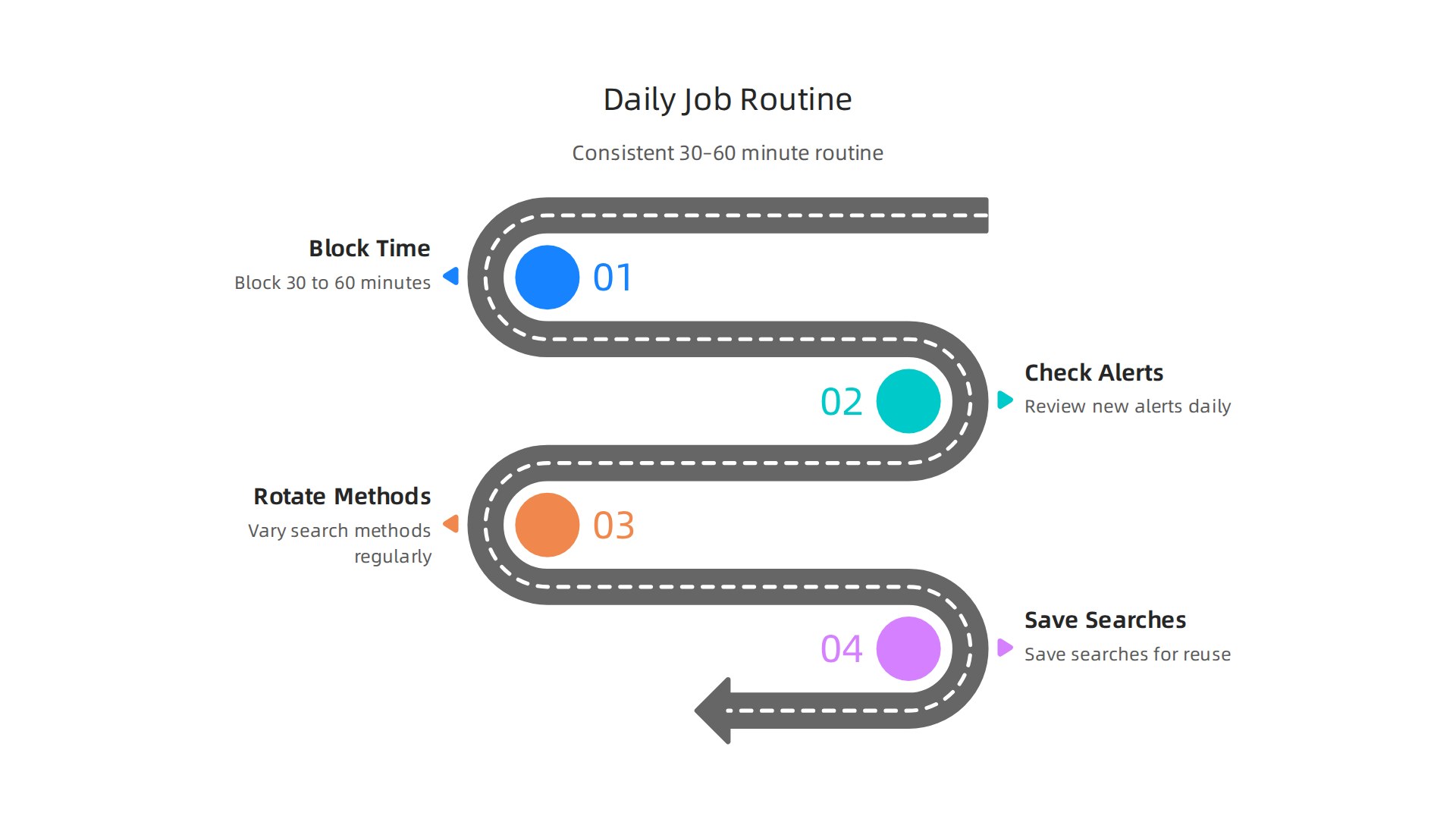
Treat it like a sales meeting you cannot skip. During this time, check your alerts. Indeed sends you new matching roles every day. Open the first ones that look promising. Apply to 3 to 5 high-quality matches. Do not spray and pray. Pick the ones where you fit at least 80 percent of the requirements.
Rotate your search methods. Do not use the same filters every day. One day, use boolean searches. Another day, filter by "remote" and "entry level." Another day, browse company pages directly. This keeps your indeed search job results fresh. You will see roles that might not appear with your usual terms.
End each session by setting up your saved searches for the next day. Indeed lets you save up to 10 searches. Use them. Name each one clearly, like "Remote Sales SaaS" or "B2B Commission Based." That way, tomorrow’s job search on indeed starts immediately. No wasted time retyping.
A well-optimized Indeed profile helps your applications get noticed. Learn how to optimize your resume for Indeed so the algorithm sends your resume to the top of the pile.
Here is the thing. A daily routine turns a scattered job search into a steady pipeline. You stay consistent. You follow up. And you stop missing deadlines.
Want to see how different job boards compare for remote sales? Check our guide on the best job board for remote sales jobs.
Build your routine today. It takes one hour. It could save you months of searching.
Ready for more proven strategies? View Resources to continue your remote sales career journey.
Summary
This article teaches advanced Indeed tactics to speed up and sharpen your remote sales job hunt so you stop wading through irrelevant or fraudulent listings. It walks through 10 practical methods — from Boolean search strings and stacked filters to automated alerts, scam detection, platform comparison, resume optimization, salary vetting, application strategy, and tracking systems — that cut noise and surface real commission-based roles. You’ll learn how to craft targeted searches, verify employers, decide when to use Easy Apply versus direct applications, and build a daily routine that treats your search like a sales pipeline. Follow these steps and you’ll spend less time scrolling, avoid common scams, get more interviews, and increase your chances of landing legitimate remote sales positions.